Skip to content

Versioner Documentation

Versioner is a deployment tracking and visibility platform designed to help engineering teams maintain a shared view of what's deployed where, detect drift, and improve auditability in release pipelines.

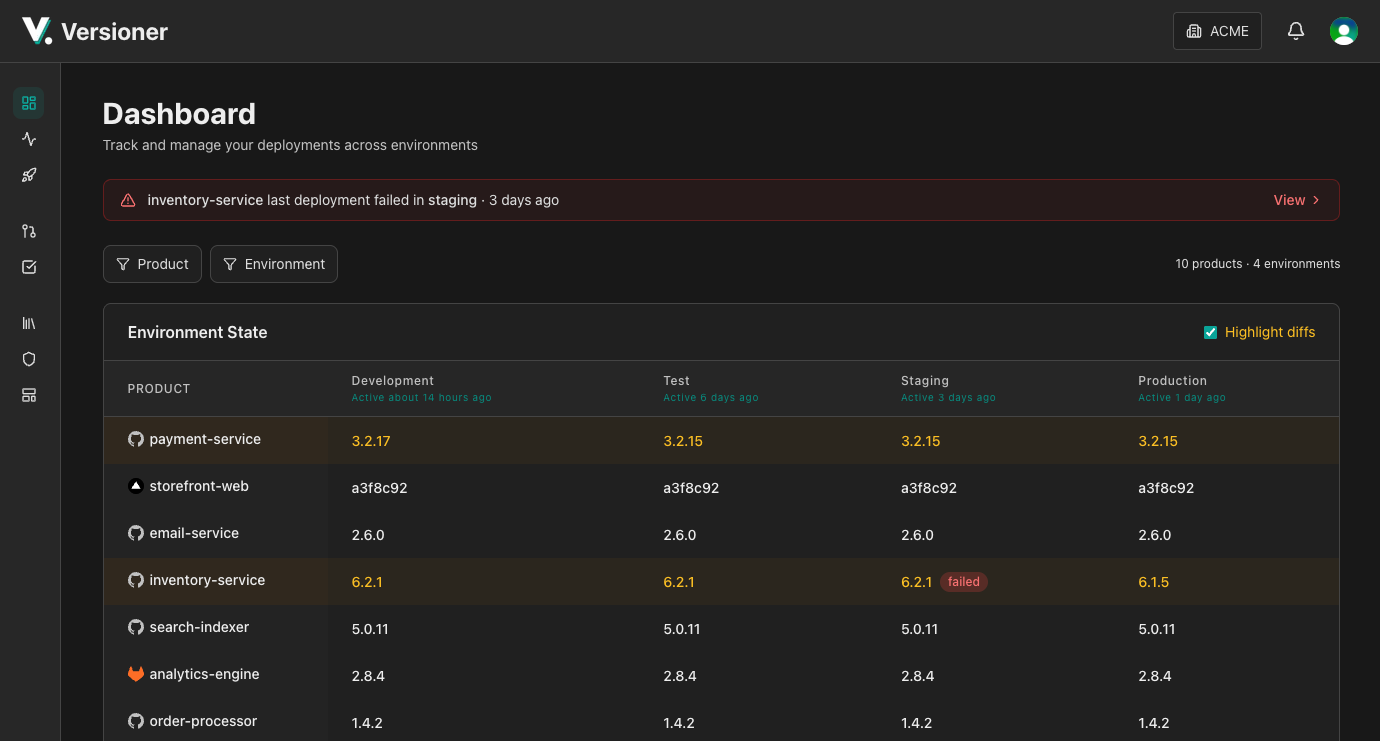
πŸ” Unified Deployment Visibility

flowchart LR
    subgraph sources["<b>Deployment Sources</b>"]
        direction TB
        gh["GitHub Actions"]
        jk["Jenkins"]
        tf["Terraform"]
        custom["Custom Scripts"]
    end

    subgraph versioner["<b>Versioner</b>"]
        direction TB
        api["REST API"]
        web["Web UI"]
    end

    subgraph outputs["<b>Visibility & Control</b>"]
        direction TB
        view["What's Deployed Where"]
        audit["Audit Trail"]
        notify["Slack Notifications"]
    end

    gh --> api
    jk --> api
    tf --> api
    custom --> api

    api --> web
    api --> notify
    web --> view
    web --> audit

    style versioner fill:#0f4c47,stroke:#14b8a6,stroke-width:3px,color:#fff
    style sources fill:#2d3748,stroke:#4a5568,stroke-width:2px,color:#fff
    style outputs fill:#2d3748,stroke:#4a5568,stroke-width:2px,color:#fff
    style gh fill:#115e59,stroke:#0d9488,stroke-width:2px,color:#fff
    style jk fill:#115e59,stroke:#0d9488,stroke-width:2px,color:#fff
    style tf fill:#115e59,stroke:#0d9488,stroke-width:2px,color:#fff
    style custom fill:#115e59,stroke:#0d9488,stroke-width:2px,color:#fff
    style api fill:#0d9488,stroke:#14b8a6,stroke-width:2px,color:#fff
    style web fill:#0d9488,stroke:#14b8a6,stroke-width:2px,color:#fff
    style view fill:#115e59,stroke:#0d9488,stroke-width:2px,color:#fff
    style audit fill:#115e59,stroke:#0d9488,stroke-width:2px,color:#fff
    style notify fill:#115e59,stroke:#0d9488,stroke-width:2px,color:#fff

πŸš€ Quick Start

Get started with Versioner in minutes:

  1. Create an account - Sign up and get your API key
  2. Choose your integration - Native (e.g. GitHub Action), CLI, or direct API
  3. Submit your first event - Track your first deployment

πŸ“š Choose Your Integration

Versioner provides multiple ways to integrate with your workflow:

  • Native Integrations


    Platform-specific plugins for GitHub Actions and more.

    View Integrations

  • CLI


    Universal command-line tool for any CI/CD system or deployment environment.

    CLI Documentation

  • REST API


    Direct API access for custom integrations and maximum control.

    API Documentation

🎯 Key Features

Deployment Tracking

Track every deployment across all your environments. Know exactly what version is running where, who deployed it, and when.

Version Management

Manage build versions with flexible versioning schemes - semantic versioning, build numbers, commit SHAs, or any custom format.

Real-time Notifications

Get instant Slack notifications for deployments, builds, and failures. Customize which events trigger notifications.

Deployment Buttons

Trigger deployments with one click. Deployment buttons in the UI and Slack notifications link directly to your deployment tools with pre-filled parameters.

Pre-flight Checks

Validate deployments before they happen. Prevent concurrent deployments, enforce no-deploy windows, and require approvals.

🧩 Core Concepts

Understanding these concepts will help you get the most out of Versioner:

  • Products - Deployable software components (services, apps, libraries)
  • Versions - Build artifacts that can be deployed
  • Deployments - Records of versions deployed to environments
  • Releases - Coordinated groupings of multiple product versions
  • Environments - Deployment targets (dev, staging, production)
  • Notifications - Real-time alerts via Slack
  • Variables - Reusable configuration values
  • Deployment Buttons - One-click deployment shortcuts

πŸ”— API Reference

Comprehensive API documentation:

πŸ’‘ Example Use Cases

CI/CD Integration

Automatically track deployments from your CI/CD pipeline:

# GitHub Actions example
- uses: versioner-io/versioner-github-action@v1
  with:
    api-key: ${{ secrets.VERSIONER_API_KEY }}
    product: my-service
    version: ${{ github.sha }} # Or version ID of your choice
    environment: production

Deployment Visibility

Query deployment history to see what's running where:

# CLI example
versioner deployments list --product my-service --environment production

πŸ†˜ Support

πŸ—ΊοΈ What's Next?

Ready to get started? Head over to the Getting Started Guide to create your account and submit your first event.

Or explore the documentation: